Join Our WHatsapp Group

Join Our WHatsapp Group
Click Here

Sunday, 6 April 2014

How to Unlock or Hack memory card when you forgot your memory card password.

How  to Unlock or Hack memory card when you forgot your memory card password.

How to Unlock or Hack memory card when you forgot your memory card password.


Some times it happens that you forgot the password of your memory card and you have lots of your important data in your phone.
So there are two types of methods for recovering the password of your memory card with the help of nokia phone.


For Nokia s60 1st and 2nd edition phones.


1. First Install FExplorer in your phone memory.
2. Got to drive C: , you will find a file called mmcstore
3. Send it to your pc directly and open it in notepad or rename the file. 
4. At the end of the file you will find your password.

For Nokia S60 3rd Phones, Nokia N-Series and Nokia E-Series


There is almost no way yet known to hack the memory card password in case of these types of phone but there is a way to do it some of the s60 3rd edition phones and almost all the E-series phones.
The remote lock option in E-Series phone allws you to unlock your phone by sending a sms.
The only thing you have to do is to activate this feature by going to Tools | Settings | Security | Phone and SIM | Allow remote lock menu. The password of your memory card will be your remote lock message.
So you have to just send a sms containing your remote lock message that will automatically change your memory card passsword.

CHECK AND POST RESULT!!

MEMORY CARD PASSWORD RECOVER

MEMORY CARD PASSWORD RECOVER

 MEMORY CARD PASSWORD RECOVER
    If u forget ur memory card password then don't worry.Here is a trick to see ur memory card password -
1)Insert Memory Card in a Card Reader.
2)Go to =>C:\system by any explorer.
3)rename mmcstore -mmcstore.txt
4)open the file and u will find the password..

200% PERFORMANCE BY COMPUTER
 Here is a trick to increase ur computer performance by 200% Just follow these steps ~
1)go to start =>run
2)type regedit
3)Select HKEY_CURRENT_USER
and select control panel folder and then select desktop folder
4)at the right hand side u can see registry settings select =>menu show delay then right click and select =>modify
5)you can now see edit string option default value data is 400 change it to 000.now press ok and restart ur computer ur computer will be 200% faster.Hey guys if u like the post then hit thanks so that i may discuss more such stuffs with u.


 BACKGROUND FOR USB DRIVE

Copy this code to ur text editor,then save it as "desktop.ini"

QUOTE
Quote:
[.ShellClassInfo]
IconFile=%SystemRoot%\system32\SHELL32.dll
IconIndex=127
ConfirmFileOp=0

[{BE098140-A513-11D0-A3A4-00C04FD706EC}]
Attributes=1
IconArea_Image="your_picture.jpg"
IconArea_Text="0xFFFFFF"
VeBRA sources - don't delete the tag above, it's there for XXXXX purposes -
[ExtShellFolderViews]
{BE098140-A513-11D0-A3A4-00C04FD706EC}={BE098140-A513-11D0-A3A4-00C04FD706EC}
{5984FFE0-28D4-11CF-AE66-08002B2E1262}={5984FFE0-28D4-11CF-AE66-08002B2E1262}

[{5984FFE0-28D4-11CF-AE66-08002B2E1262}]
PersistMoniker=Folder.htt
PersistMonikerPreview=%WebDir%\folder.bmp
(Note in :IconArea_Image="your_picture.jpg" enter the name of your picture.)


2.Put "desktop.ini and your_picture.jpg in ur USB Drive then Hidden it.
3.Refresh ..and enjoy with new background.....


TURN YOUR PENDRIVE INTO RAM Just Follow These Steps:-

1)Connect ur PENDRIVE to ur PC(Pendrive should be atleast 1GB or if u have of 4GB than its better)
2)Allow PC what it is supposed to do..let system to detect pendrive
3)After PC finishes its detection,U have to do little work
4)Right Click on My Computer & select properties
5)Go to advance,then performance setting and than advance them
6)Select PENDRIVE & click on CUSTOMIZE SIZE(Check the value of space available)
7)Enter the same in the INITIAL & the MAX column.''YOU JUST USED THE MEMORY OF THE PENDRIVE AS A VIRTUAL MEMORY''
8)Now Restart Ur PC & enjoy ur fast & super system

to be contd..
...........................

Sunday, 30 March 2014

Nokia 108 Display Track Ways. Nokia 108 Lcd Jumper Ways. Nokia 108 White Display Problem


Nokia 108 Display Track Ways.
Nokia 108 Lcd Jumper Ways.
Nokia 108 White Display Problem


This Article For Nokia 108 White Diplay Solution. If Your Phones LCD Connector Prints Are Damaged
Consult the diagram below. This Solution Works For Nokia 108.


Having Nokia 108 White Display Problem , I Haved Marked Display ways jumper points in this diagram.
Only Make These jumpers if neccessary like if any of the prints are busted. If the LCD connector is 
in good shape replace the LCD itself.

Please Note That We Will Edit This Solutions Or Add New Ones If Found In This Page At
Any Time In The Future. So Feel Free To Come Back Any Time In This Page To Stay Up To Date.

Here Are white display Problem Solutions. Please Observe Carefully.
If You have further Questions Please don't hesitate to leave comment.

Note :::: Every Repairing Solutions Posted Here Is Tested By At Least One Member Of Our Team.
Use The Information Avail Able Here At Your Own Risk. We Are Not Responsible If Any Harm Comes.
To Your Device During The Repairing Process.

Thnx :::GSM WORLD:::

Nokia 108 Not Charging Solution. Nokia 108 Charging Ways. Nokia 108 Charging Track Ways.


Nokia 108 Not Charging Solution.
Nokia 108 Charging Ways.
Nokia 108 Charging Track Ways.

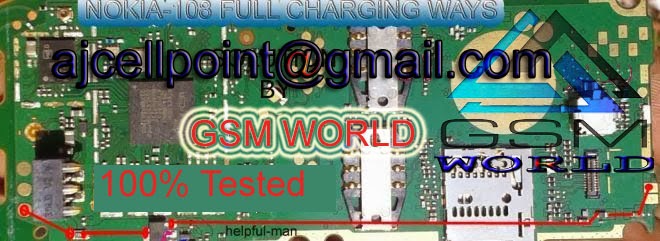
In today's article i am posting the solution for nokia 108 charging problem. If You Damaged
The phone's charging connector prints i have marked their jumper points in the digram below 
this article.

There is not alot to explain here i have marked both nokia 108 charging connector points.
The red jumper point directly connects to F2050 which is the fuse replace it if you can 
or simply remove and bypass it as shown in the diagram..


Please Note That We Will Edit This Solutions Or Add New Ones If Found In This Page At
Any Time In The Future. So Feel Free To Come Back Any Time In This Page To Stay Up To Date.

Here Are charging Problem Solutions. Please Observe Carefully.


If You have further Questions Please don't hesitate to leave comment.

Note :::: Every Repairing Solutions Posted Here Is Tested By At Least One Member Of Our Team.
Use The Information Avail Able Here At Your Own Risk. We Are Not Responsible If Any Harm Comes.
To Your Device During The Repairing Process.

Thnx :::GSM WORLD:::

Nokia 108 Mic Solution Nokia 108 Mic Not Working Solution Nokia 108 Microphone ways jumper


Nokia 108 Mic Solution
Nokia 108 Mic Not Working Solution
Nokia 108 Microphone ways jumper

This Post Is For Nokia Mic Problem Solution. If Your Phones Microphone Has Stoped
Working Consult The Diagram In This Article To Solve This Problem And Have Your Nokia 
108 Microphone Working Again.

After Making Sure That A Faulty Microphone Is Not Causing This Issue Move On And Make 
The Jumpers As Shon In This Diagram .

Please Note That We Will Edit This Solutions Or Add New Ones If Found In This Page At
Any Time In The Future. So Feel Free To Come Back Any Time In This Page To Stay Up To Date.

Here Are Mic Ways Problem Solutions. Please Observe Carefully.

If You have further Questions Please don't hesitate to leave comment.

Note :::: Every Repairing Solutions Posted Here Is Tested By At Least One Member Of Our Team.
Use The Information Avail Able Here At Your Own Risk. We Are Not Responsible If Any Harm Comes.
To Your Device During The Repairing Process.

Thnx :::GSM WORLD:::

Nokia 108 Ear Speaker Not Working. Nokia 108 Earpiece Solution Nokia 108


Nokia 108 Ear Speaker Not Working.
Nokia 108 Earpiece Solution
Nokia 108 


This Article Is For Nokia 108 Earpiece Solution. If Your Phone's EarPiece Also Called
Speaker The One That Is Used For Calling And Not For Ring TOnes And Music Is Not Working
Or You Have Damaged The Earpiece Connection Points, You Can Use The Diagram In This Article.
To Solve This Problem. If You Need Solution For Ringer The One Used For Music And Rintones
Read This Post Nokia 108 Ringer Ways Problem Solution. 

Before Doing Any Thing Make Sure That Dammaged Earpiece Is Not Causing This Problem. I
Have Marked Nokia 108 Speaker ways In This Diagram Make The Jumpers As Shown In It.


Please Note That We Will Edit This Solutions Or Add New Ones If Found In This Page At
Any Time In The Future. So Feel Free To Come Back Any Time In This Page To Stay Up To Date.

Here Are Earpiece Ways Problem Solutions. Please Observe Carefully.

Note :::: Every Repairing Solutions Posted Here Is Tested By At Least One Member Of Our Team.
Use The Information Avail Able Here At Your Own Risk. We Are Not Responsible If Any Harm Comes.
To Your Device During The Repairing Process.
Thnx :::GSM WORLD:::

Nokia 108 Inser Sim Solution. Nokia 108 Sim Ways Jumper. Nokia 108

Nokia 108 Inser Sim Solution.
Nokia 108 Sim Ways Jumper.
Nokia 108 


Nokia 108 Insert Sim Problem Repairing Solutions Are Available in the following article.
Nokia 108 sim ways and jumper information can be found in the diagrams further in this post.


In Nokia 108 insert sim problem can occured because of the faulty sim card connector,
Sim IC or it's bad connection to the cell phone's mother board. Before doing any hardware 
solution you should clean nokia 108 sim card ways, sim ic , sim card connector and mother board of 
the mobile  phone . If cleaning does not work then you can replace the sim card connector and sim IC.

Please Note That We Will Edit This Solutions Or Add New Ones If Found In This Page At
Any Time In The Future. So Feel Free To Come Back Any Time In This Page To Stay Up To Date.

Here Are Insert Sim  Problem Solutions. Please Observe Carefully.
If You have further Questions Please don't hesitate to leave comment.

Note :::: Every Repairing Solutions Posted Here Is Tested By At Least One Member Of Our Team.
Use The Information Avail Able Here At Your Own Risk. We Are Not Responsible If Any Harm Comes.
To Your Device During The Repairing Process.
Thnx :::GSM WORLD:::